I’ve been building websites since 1996. In that time, I’ve watched the industry pivot from table-based layouts to responsive design, from keyword stuffing to semantic SEO, and from “just get a website” to “your website is your most important marketing asset.”
But what’s happening right now is the biggest shift I’ve seen yet.
In 2024, Gartner predicted that traditional search engine volume would drop 25% by 2026 as AI chatbots become how people find information. As of November 2025, SEMRush says AI search traffic is up 527% year over year, and roughly 69% of websites now get traffic from AI platforms.
Read that again. If your business isn’t visible to ChatGPT, Perplexity, Claude, and Google’s AI Overviews, you’re becoming invisible to a growing chunk of your potential customers.
The good news is, there’s a straightforward way to tell AI systems what your business does and why your content matters. It’s called an llms.txt file.
The bad news is, the auto-generated versions, including the one plugins like Yoast SEO spits out, are about as useful as a business card with just your name on it.
Let me show you what we did to fix ours, and how you can do the same.
Welcome to Generative Engine Optimization (Because We Needed Another Acronym)
We’ve got yet another content optimization buzzword: GEO (Generative Engine Optimization). It’s like SEO, but instead of optimizing for Google’s blue links, you’re optimizing to get cited when AI answers someone’s question.
Think about how people search now. Instead of typing “best WordPress security plugin” into Google and clicking through ten results, they’re asking ChatGPT, in the form of a full question, and getting a synthesized answer with sources.
The websites that get cited drive traffic.
The websites that don’t might as well not exist for that user.
This isn’t theoretical anymore. It’s happening right now, and it’s only accelerating.
So What Exactly Is an llms.txt File?
The llms.txt file is a proposal from Answer.AI that gives AI systems a clean, easy-to-parse summary of your website. Think of it as a robots.txt for AI. Except instead of telling crawlers what to ignore, it tells them what you’re all about and where your best content lives.
It’s a Markdown file that sits in your website’s root directory (like yoursite.com/llms.txt). AI systems can read Markdown far faster than they can parse a full HTML page, so this gives them a quick way to understand your site’s structure and expertise.
A solid llms.txt file should include:
- Who you are: Not just a tagline. Add actual context about your business.
- What you do: Detailed service descriptions, not just “We do web design”.
- Your best content: Links with explanations of what each piece covers.
- Why you’re credible: Team experience, credentials, specializations.
- How you’re organized: Topical groupings that show your areas of expertise.
Simple concept. But the execution matters enormously.
The Problem: Yoast’s Auto-Generated File Is… Fine, I Guess
I like Yoast. We use it. It’s a solid SEO plugin. We have also used RankMath SEO, and it’s also got some great features.
But the auto-generated llms.txt features of these plugins are not awesome. They’re the equivalent of showing up to a job interview with a résumé that just lists your previous job titles with no descriptions.
Here’s what Yoast generated for our website:
Generated by Yoast SEO v25.9, this is an llms.txt file, meant for consumption by LLMs.

The XML sitemap of this website can by found by following [this link](https://dev-webidextrous.pantheonsite.io/sitemap_index.xml).

# Webidextrous LLC: The Web\. Coordinated\.

> We offer advanced digital solutions and creative services to fuel growth, strengthen brand image, and extend market presence\.

## Pages
- [Blog](https://dev-webidextrous.pantheonsite.io/blog/)
- [About](https://dev-webidextrous.pantheonsite.io/about/)
- [Web](https://dev-webidextrous.pantheonsite.io/web/)
- [Home](https://dev-webidextrous.pantheonsite.io/)
- [Webidextrous WebFlip Wisdom](https://dev-webidextrous.pantheonsite.io/webidextrous-webflip-wisdom/)

## Posts
- [Giving Machines: Where Your Spare Change Buys Goats, Books, and Hope](https://dev-webidextrous.pantheonsite.io/giving-machines-spare-change-buys-goats-books-hope/): Discover Giving Machines—holiday vending machines that let you donate goats, books, and more to charity instead of buying snacks\. 100% goes to those in need\.
- [Wordfence WordPress Security Plugin: A Comprehensive 2025 Review](https://dev-webidextrous.pantheonsite.io/wordfence-wordpress-security-plugin-a-comprehensive-2025-review/)
- [Kadence WordPress Theme: A Comprehensive 2025 Review](https://dev-webidextrous.pantheonsite.io/kadence-wordpress-theme-a-comprehensive-2025-review/)
- [How AI Is Silently Changing SEO: The 1,700% Traffic Surge No One's Talking About](https://dev-webidextrous.pantheonsite.io/how-ai-is-silently-changing-seo-the-1700-traffic-surge-no-ones-talking-about/)

## Pattern Library
- [Web Hosting Section](https://dev-webidextrous.pantheonsite.io/cloud/web-hosting/)
- [Design \& Development Section](https://dev-webidextrous.pantheonsite.io/cloud/design-development-section/)

## Elements
- [Below the Category](https://dev-webidextrous.pantheonsite.io/?kadence_element=below-the-category)
- [Search Results](https://dev-webidextrous.pantheonsite.io/?kadence_element=single-post)
- [404  Sorry, Page not found](https://dev-webidextrous.pantheonsite.io/?kadence_element=404-sorry-page-not-found)

## Knowledge Base
- [SEO Learning Outline: 10\+ Tips to Supercharge Your Neglected Websites](https://dev-webidextrous.pantheonsite.io/kb/seo-learning-outline-10-tips-to-supercharge-your-neglected-websites/): SEO learning doesn't have to be hard\! Learn how to do SEO on your own with this learning outline from Webidextrous\.com
- [WordPress Plugin Review: Pie Calendar \- Event Calendar](https://dev-webidextrous.pantheonsite.io/kb/wordpress-plugin-pie-calendar-review/): The Pie Calendar WordPress plugin is designed to simplify the process of adding event calendars to your website\.
- [6 tips for a real estate website workflow](https://dev-webidextrous.pantheonsite.io/kb/6-tips-for-a-real-estate-website-workflow/): These are the six most effective things you can do to boost lead generation on your real estate website\.
- [MySQL and WP\-Cron Performance Effects in WordPress and WooCommerce](https://dev-webidextrous.pantheonsite.io/kb/mysql-wp-cron-performance-effects-wordpress-woocommerce/): MySQL and WP\-Cron performance effects are problems that can really haunt you\. This case study shows reasons why the problems occur and how to resolve them\.
- [How We Remove JetPack and Instantly Improve WordPress Performance by Over 50%](https://dev-webidextrous.pantheonsite.io/kb/how-remove-jetpack-improve-wordpress-performance/): JetPack is ruining your WordPress site's performance\. Here's how we fixed that\.

## Categories
- [Web Design](https://dev-webidextrous.pantheonsite.io/category/web-design/)
- [Social Media](https://dev-webidextrous.pantheonsite.io/category/social-media/)
- [Digital Advertising](https://dev-webidextrous.pantheonsite.io/category/digital-advertising/)
- [Project Management](https://dev-webidextrous.pantheonsite.io/category/project-management/)
- [Professional Development](https://dev-webidextrous.pantheonsite.io/category/professional-development/)

## Tags
- [web design](https://dev-webidextrous.pantheonsite.io/tag/web-design/)
- [social media](https://dev-webidextrous.pantheonsite.io/tag/social-media/)
- [wordpress](https://dev-webidextrous.pantheonsite.io/tag/wordpress/)
- [pricing](https://dev-webidextrous.pantheonsite.io/tag/pricing/)
- [digital advertising](https://dev-webidextrous.pantheonsite.io/tag/digital-advertising/)

## Categories
- [WordPress](https://dev-webidextrous.pantheonsite.io/kb/category/wordpress/)
- [Hosting](https://dev-webidextrous.pantheonsite.io/kb/category/hosting/)
- [Customer Service](https://dev-webidextrous.pantheonsite.io/kb/category/customer-service/)
- [Search Engine Optimization](https://dev-webidextrous.pantheonsite.io/kb/category/search-engine-optimization/)
- [Website Security](https://dev-webidextrous.pantheonsite.io/kb/category/website-security/)

## Tags
- [wordpress](https://dev-webidextrous.pantheonsite.io/kb/tag/wordpress/)
- [customer service](https://dev-webidextrous.pantheonsite.io/kb/tag/customer-service/)
- [hosting](https://dev-webidextrous.pantheonsite.io/kb/tag/hosting/)
- [security](https://dev-webidextrous.pantheonsite.io/kb/tag/security/)
- [SEO](https://dev-webidextrous.pantheonsite.io/kb/tag/seo/)
That’s… technically an llms.txt file. In the same way that a hot dog is technically a sandwich. It meets the minimum definition, but it’s not winning any awards.
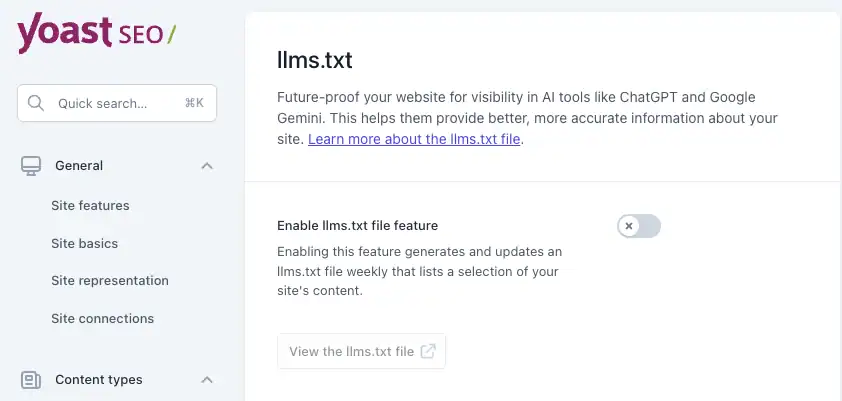
The Yoast documentation says the file gets “updated weekly by a scheduled action.” Great for automation. Not great for actually telling AI systems why your content matters.
For our site, which uses the Kadence theme and builder, the llms.txt that Yoast generated also included patterns and templates that aren’t actually our content as a whole. So, Yoast has dropped the ball there as well.
Here’s the bigger problem for Yoast to solve: AI needs context. A bare URL with a title doesn’t tell ChatGPT why your WordPress security article is worth citing, what problems it solves, or how it connects to your broader expertise. Without that context, you’re just noise in the signal.
What We Actually Did: From Thin to Comprehensive
Automation is fine for some things. But not for curating your business information and your website’s best content in an llms.txt file.
I took our own Yoast-generated llms.txt and completely rebuilt it. As you can see above, the auto-generated version was about 50 lines. A basic link dump. Our optimized version runs about 350 lines of rich, contextual information.
We Actually Described Who We Are
The auto-generated version had our tagline. Helpful. But not enough.
Our new version opens with this:
> Webidextrous is a full-service web agency specializing in WordPress design and development, SEO, content creation, digital marketing, AI integration, and website maintenance. Founded in 2009 by industry veteran Rob Watson, the agency helps businesses establish, enhance, and optimize their online presence with tailored solutions that deliver measurable results.We Explained Our Services Instead of Just Linking to Them
Before, we had a link to our “Web” page. Very descriptive. But also not enough.
Now we have actual service descriptions:
### WordPress Maintenance & Security
Comprehensive WordPress maintenance packages include regular updates, security monitoring, malware scanning, performance optimization, and proactive website monitoring to ensure sites remain secure and high-performing.
When an AI is looking for content about WordPress security services, it can now understand that we actually provide this—and what it includes.
We Organized Content by Topic, Not Just by Post Type
Yoast dumps everything into “Posts” and “Pages.” We reorganized into topical clusters:
## WordPress Technical Guides

## Web Hosting & DevOps

## Website Security

## SEO & Content Strategy

## eCommerce & WooCommerce

## Customer Service & Business Operations
This signals to AI that we have deep expertise in specific areas, not just a random collection of blog posts. Topical authority matters.
We Added Our Team
Auto-generated files don’t include team information. Ours now lists:
## Team

- **Rob Watson** - CEO, Founder: Web industry veteran since 1996, founded Webidextrous in 2009 with three decades of experience helping businesses establish and improve their web presence.
- **Shannon Watson** - CFO and Business Writer: Co-founder specializing in research, content strategy, and business storytelling.
- **Christy Cañete** - Web Maintenance Manager: WordPress maintenance specialist with front-end development expertise in JavaScript, ReactJS, Next.js, and Node.js.
This establishes E-E-A-T (Experience, Expertise, Authoritativeness, Trust). These are signals that both Google and AI systems use to evaluate credibility.
We Mentioned Things a Robot Would Never Think Of
Our file now notes that we offer white-label services to other agencies. That’s a detail that drives real business but would never appear in an auto-generated list. It’s the kind of human insight that makes the difference between a file that exists and a file that works.
## White-Label Services

Webidextrous provides white-label WordPress maintenance, custom design and development, AI projects, and consulting services to other agencies.
How to Deploy Your New llms.txt File
This is the easy part. Seriously.
For WordPress Sites:
Option 1: Just Upload the File
- Save your optimized content as a plain text file named
llms.txt - Connect via FTP or your hosting file manager
- Drop it in your root directory (same folder as
wp-config.php) - Visit
yoursite.com/llms.txtto verify it’s there
That’s it. You’re done. Grab a coffee.
Option 2: Use a File Manager Plugin
If you prefer managing files from your WordPress dashboard, there are plugins for that:
- File Manager for WordPress
- File Manager Pro – Filester for WordPress
These give you the ability to upload your file right in WordPress so you can tweak everything without FTP access. For extra security, be sure to uninstall these plugins after you’re done with your edits.
For Non-WordPress Sites:
- Static sites: Put the file in your root directory before deployment.
- Shopify: Currently painful. Shopify doesn’t let you easily add files to the root directory.
- Squarespace: Limited support, check with their team.
- HubSpot: Feature request is pending in the HubSpot Community, but there is a workaround using proxy redirects.
Can You Ditch Yoast’s Feature Now?
Yes. In fact, you should.
Once your custom llms.txt file is in place, Yoast’s scheduled updates could overwrite it with their generic version. That would be bad.
To disable Yoast’s auto-generation:
- Go to Yoast SEO → Settings
- Find the llms.txt feature
- Turn it off
Your handcrafted file stays put. Problem solved.
Keeping Your llms.txt File Fresh
Unlike robots.txt, which you set and forget, your llms.txt should evolve as your site grows. Here’s what we do:
Monthly:
- Add new blog posts and articles with descriptions
- Update service offerings if anything changed
- Remove content that’s outdated or no longer relevant
Quarterly:
- Review the topical organization—do we need new categories?
- Update team info if we’ve added people or roles changed
- Look at what competitors are doing with their llms.txt files
Annually:
- Full audit against the sitemap to make sure nothing’s missing
- Refresh the company overview and positioning
- Consider if the overall structure still makes sense
You can see who else has implemented llms.txt files at llmstxt.site. It’s a curated, “submit your own site” directory, sort of like Yahoo.com used to be back in the day, and a growing list as more businesses catch on to this.
The Bottom Line
Here’s my honest take after three decades in this industry: the businesses that adapt early to platform shifts are the ones that thrive. The ones that wait until it’s “proven” spend years playing catch-up.
AI search is not a fad. It’s not going away. The percentage of searches happening through AI interfaces is only going up, and the websites that AI systems understand and trust are the ones that will capture that traffic.
An optimized llms.txt file is one of the simplest things you can do to get ahead of this curve. It costs nothing but time. It requires no technical overhaul of your site. And it positions you as a credible source worth citing.
You can let a plugin generate a bare-minimum link list, or you can spend an afternoon creating something that actually represents your business.
I know which one I’d bet on.
Want help getting your website ready for AI search? We do this for you. Get in touch and let’s talk about a comprehensive GEO audit and custom llms.txt for your site.